Images as Code.
Write JSX compositions with full CSS support. Export as images. No browser window, no server, no ceremony.
npm install grafex import type { CompositionConfig } from 'grafex';
export const config: CompositionConfig = {
width: 1200,
height: 630,
};
export default function Card() {
return (
<div
style={{
width: '100%',
height: '100%',
background: 'linear-gradient(135deg, #667eea, #764ba2)',
display: 'flex',
alignItems: 'center',
justifyContent: 'center',
color: 'white',
fontSize: '64px',
fontWeight: 'bold',
fontFamily: 'system-ui, sans-serif',
}}
>
Hello, Grafex!
</div>
);
}Why Grafex?
Full CSS. Real browser engine. Zero configuration. The image composition tool you actually wanted.
Full CSS Support
Flexbox, Grid, gradients, shadows, custom fonts — real CSS rendered by a real browser engine. Not a subset. Not reimplemented. The real thing.
Fast Renders
5-50ms warm renders. Sub-second cold starts. WebKit launches once and stays ready.
AI-Friendly
Compositions are plain JSX functions. Any LLM can write them, modify them, and reason about them.
No Browser Window
WebKit runs headlessly behind the scenes. No Puppeteer scripts. No browser lifecycle management. Just import, render, done.
Compositions Are Just Functions
A composition is a TSX file that exports a function and a config. Accept props, use components, style with CSS — all the patterns you already know.
export const config = {
width: 600,
height: 400,
};
export default function OgCard() {
return (
<div
style={{
width: '100%',
height: '100%',
background: 'linear-gradient(145deg, #0f172a 0%, #1e293b 100%)',
display: 'flex',
flexDirection: 'column',
justifyContent: 'space-between',
padding: '52px',
fontFamily: 'system-ui, -apple-system, sans-serif',
position: 'relative',
overflow: 'hidden',
}}
>
{/* Top accent glow */}
<div
style={{
position: 'absolute',
top: '-60px',
right: '-60px',
width: '300px',
height: '300px',
background: 'radial-gradient(circle, rgba(244,114,182,0.2) 0%, transparent 70%)',
}}
/>
{/* Top: tag */}
<div style={{ display: 'flex', alignItems: 'center', gap: '12px', zIndex: 1 }}>
<div
style={{
background: 'rgba(163,230,53,0.15)',
border: '1px solid rgba(163,230,53,0.3)',
borderRadius: '6px',
padding: '4px 12px',
color: '#A3E635',
fontSize: '12px',
fontWeight: '600',
letterSpacing: '0.08em',
textTransform: 'uppercase',
}}
>
Tutorial
</div>
<span style={{ color: '#475569', fontSize: '13px' }}>5 min read</span>
</div>
{/* Middle: title */}
<div style={{ display: 'flex', flexDirection: 'column', gap: '16px', zIndex: 1 }}>
<div
style={{
color: '#F1F5F9',
fontSize: '36px',
fontWeight: '700',
lineHeight: '1.2',
letterSpacing: '-0.5px',
}}
>
Building Modern APIs
</div>
<div style={{ color: '#94A3B8', fontSize: '16px', lineHeight: '1.5' }}>
Best practices for REST and GraphQL in 2026
</div>
</div>
{/* Bottom: author + meta */}
<div
style={{
display: 'flex',
alignItems: 'center',
justifyContent: 'space-between',
zIndex: 1,
}}
>
<div style={{ display: 'flex', alignItems: 'center', gap: '12px' }}>
<div
style={{
width: '36px',
height: '36px',
borderRadius: '50%',
background: 'linear-gradient(135deg, #F472B6, #38BDF8)',
display: 'flex',
alignItems: 'center',
justifyContent: 'center',
color: 'white',
fontSize: '14px',
fontWeight: '700',
flexShrink: 0,
}}
>
JS
</div>
<div style={{ display: 'flex', flexDirection: 'column', gap: '2px' }}>
<span style={{ color: '#E2E8F0', fontSize: '14px', fontWeight: '600' }}>
Jane Smith
</span>
<span style={{ color: '#64748B', fontSize: '12px' }}>March 15, 2026</span>
</div>
</div>
<div
style={{
color: '#475569',
fontSize: '13px',
fontWeight: '600',
letterSpacing: '0.05em',
}}
>
dev.blog
</div>
</div>
{/* Bottom-left accent stripe */}
<div
style={{
position: 'absolute',
bottom: '0',
left: '0',
right: '0',
height: '3px',
background: 'linear-gradient(90deg, #F472B6, #38BDF8, #A3E635)',
}}
/>
</div>
);
} og-card.png
 npx grafex export -f og-card.tsx -o og-card.pngWhat You Can Build
Open Graph Images
Dynamic social previews for every page, generated at build time.
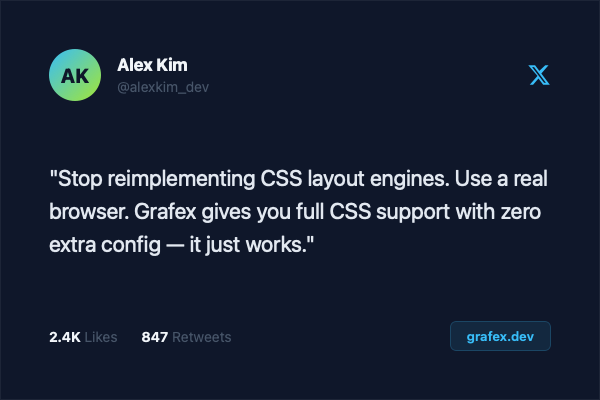
Social Media Cards
Branded cards for Twitter, LinkedIn, and Instagram — from one template.

Email & Web Banners
Programmatic banner generation with consistent branding across campaigns.

Certificates
Event certificates and awards with dynamic names, dates, and details.

Video Thumbnails
YouTube and podcast covers generated from a single template.
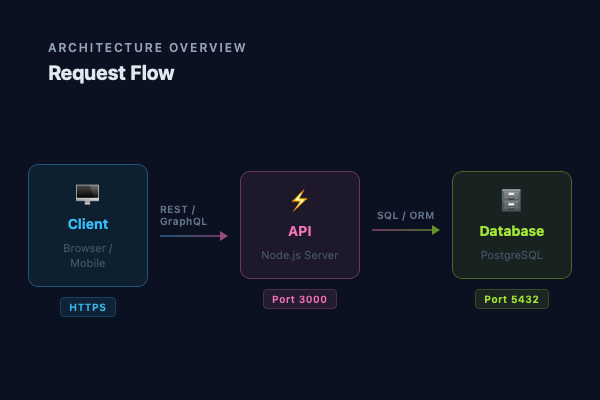
Diagrams & Charts
Architecture diagrams and data visualizations, version-controlled as code.
Get Started in 3 Steps
Install
One package. WebKit is downloaded automatically.
npm install grafexWrite a composition
Create a TSX file. Export a component and a config.
// card.tsx
import type { CompositionConfig } from 'grafex';

export const config: CompositionConfig = { width: 1200, height: 630 };

export default function Card() {
  return (
    <div
      style={{
        width: '100%',
        height: '100%',
        background: 'linear-gradient(135deg, #667eea, #764ba2)',
        display: 'flex',
        alignItems: 'center',
        justifyContent: 'center',
        color: 'white',
        fontSize: '64px',
        fontWeight: 'bold',
        fontFamily: 'system-ui, sans-serif',
      }}
    >
      Hello, Grafex!
    </div>
  );
}Export
Run one command. Get an image.
npx grafex export -f card.tsx -o card.png