Examples
Real compositions you can copy, modify, and render. Each example shows the rendered output and the full source code.
OG Card
A blog post Open Graph image with gradient background, tag badge, title, author avatar, and accent stripe.

bash
npx grafex export -f og-card.tsx -o og-card.pngog-card.tsx
export const config = {
  width: 600,
  height: 400,
};

export default function OgCard() {
  return (
    <div
      style={{
        width: '100%',
        height: '100%',
        background: 'linear-gradient(145deg, #0f172a 0%, #1e293b 100%)',
        display: 'flex',
        flexDirection: 'column',
        justifyContent: 'space-between',
        padding: '52px',
        fontFamily: 'system-ui, -apple-system, sans-serif',
        position: 'relative',
        overflow: 'hidden',
      }}
    >
      {/* Top accent glow */}
      <div
        style={{
          position: 'absolute',
          top: '-60px',
          right: '-60px',
          width: '300px',
          height: '300px',
          background: 'radial-gradient(circle, rgba(244,114,182,0.2) 0%, transparent 70%)',
        }}
      />

      {/* Top: tag */}
      <div style={{ display: 'flex', alignItems: 'center', gap: '12px', zIndex: 1 }}>
        <div
          style={{
            background: 'rgba(163,230,53,0.15)',
            border: '1px solid rgba(163,230,53,0.3)',
            borderRadius: '6px',
            padding: '4px 12px',
            color: '#A3E635',
            fontSize: '12px',
            fontWeight: '600',
            letterSpacing: '0.08em',
            textTransform: 'uppercase',
          }}
        >
          Tutorial
        </div>
        <span style={{ color: '#475569', fontSize: '13px' }}>5 min read</span>
      </div>

      {/* Middle: title */}
      <div style={{ display: 'flex', flexDirection: 'column', gap: '16px', zIndex: 1 }}>
        <div
          style={{
            color: '#F1F5F9',
            fontSize: '36px',
            fontWeight: '700',
            lineHeight: '1.2',
            letterSpacing: '-0.5px',
          }}
        >
          Building Modern APIs
        </div>
        <div style={{ color: '#94A3B8', fontSize: '16px', lineHeight: '1.5' }}>
          Best practices for REST and GraphQL in 2026
        </div>
      </div>

      {/* Bottom: author + meta */}
      <div
        style={{
          display: 'flex',
          alignItems: 'center',
          justifyContent: 'space-between',
          zIndex: 1,
        }}
      >
        <div style={{ display: 'flex', alignItems: 'center', gap: '12px' }}>
          <div
            style={{
              width: '36px',
              height: '36px',
              borderRadius: '50%',
              background: 'linear-gradient(135deg, #F472B6, #38BDF8)',
              display: 'flex',
              alignItems: 'center',
              justifyContent: 'center',
              color: 'white',
              fontSize: '14px',
              fontWeight: '700',
              flexShrink: 0,
            }}
          >
            JS
          </div>
          <div style={{ display: 'flex', flexDirection: 'column', gap: '2px' }}>
            <span style={{ color: '#E2E8F0', fontSize: '14px', fontWeight: '600' }}>
              Jane Smith
            </span>
            <span style={{ color: '#64748B', fontSize: '12px' }}>March 15, 2026</span>
          </div>
        </div>
        <div
          style={{
            color: '#475569',
            fontSize: '13px',
            fontWeight: '600',
            letterSpacing: '0.05em',
          }}
        >
          dev.blog
        </div>
      </div>

      {/* Bottom-left accent stripe */}
      <div
        style={{
          position: 'absolute',
          bottom: '0',
          left: '0',
          right: '0',
          height: '3px',
          background: 'linear-gradient(90deg, #F472B6, #38BDF8, #A3E635)',
        }}
      />
    </div>
  );
}
Social Media Card
A Twitter/LinkedIn quote card with avatar, quote text, engagement stats, and branding.

bash
npx grafex export -f social-card.tsx -o social-card.pngsocial-card.tsx
export const config = {
  width: 600,
  height: 400,
};

export default function SocialCard() {
  return (
    <div
      style={{
        width: '100%',
        height: '100%',
        background: '#0F172A',
        display: 'flex',
        flexDirection: 'column',
        justifyContent: 'space-between',
        padding: '48px',
        fontFamily: 'system-ui, -apple-system, sans-serif',
        border: '1px solid rgba(255,255,255,0.06)',
      }}
    >
      {/* Profile row */}
      <div style={{ display: 'flex', alignItems: 'center', gap: '16px' }}>
        <div
          style={{
            width: '52px',
            height: '52px',
            borderRadius: '50%',
            background: 'linear-gradient(135deg, #38BDF8, #A3E635)',
            display: 'flex',
            alignItems: 'center',
            justifyContent: 'center',
            color: '#0F172A',
            fontSize: '20px',
            fontWeight: '800',
            flexShrink: 0,
          }}
        >
          AK
        </div>
        <div style={{ display: 'flex', flexDirection: 'column', gap: '3px' }}>
          <span style={{ color: '#F1F5F9', fontSize: '17px', fontWeight: '700' }}>Alex Kim</span>
          <span style={{ color: '#475569', fontSize: '14px' }}>@alexkim_dev</span>
        </div>
        <div style={{ marginLeft: 'auto' }}>
          <svg
            width="24"
            height="24"
            viewBox="0 0 24 24"
            fill="#38BDF8"
            style={{ display: 'block' }}
          >
            <path d="M18.244 2.25h3.308l-7.227 8.26 8.502 11.24H16.17l-4.714-6.231-5.401 6.231H2.744l7.73-8.835L1.254 2.25H8.08l4.253 5.622zm-1.161 17.52h1.833L7.084 4.126H5.117z" />
          </svg>
        </div>
      </div>

      {/* Quote */}
      <div
        style={{
          color: '#E2E8F0',
          fontSize: '22px',
          lineHeight: '1.5',
          fontWeight: '400',
          flex: 1,
          display: 'flex',
          alignItems: 'center',
          padding: '20px 0',
        }}
      >
        "Stop reimplementing CSS layout engines. Use a real browser. Grafex gives you full CSS
        support with zero extra config — it just works."
      </div>

      {/* Bottom row */}
      <div style={{ display: 'flex', alignItems: 'center', justifyContent: 'space-between' }}>
        <div style={{ display: 'flex', gap: '24px' }}>
          <span style={{ color: '#475569', fontSize: '14px' }}>
            <span style={{ color: '#F1F5F9', fontWeight: '600' }}>2.4K</span> Likes
          </span>
          <span style={{ color: '#475569', fontSize: '14px' }}>
            <span style={{ color: '#F1F5F9', fontWeight: '600' }}>847</span> Retweets
          </span>
        </div>
        <div
          style={{
            background: 'rgba(56,189,248,0.1)',
            border: '1px solid rgba(56,189,248,0.2)',
            borderRadius: '6px',
            padding: '6px 16px',
            color: '#38BDF8',
            fontSize: '13px',
            fontWeight: '600',
          }}
        >
          grafex.dev
        </div>
      </div>
    </div>
  );
}
Email Banner
A promotional banner with bold typography, discount callout, and call-to-action button.

bash
npx grafex export -f banner.tsx -o banner.pngbanner.tsx
export const config = {
  width: 600,
  height: 400,
};

export default function Banner() {
  return (
    <div
      style={{
        width: '100%',
        height: '100%',
        background: '#0B0E14',
        display: 'flex',
        flexDirection: 'column',
        fontFamily: 'system-ui, -apple-system, sans-serif',
        overflow: 'hidden',
        position: 'relative',
      }}
    >
      {/* Pink top accent stripe */}
      <div
        style={{
          height: '6px',
          background: 'linear-gradient(90deg, #F472B6, #FB923C)',
          flexShrink: 0,
        }}
      />

      {/* Main content */}
      <div
        style={{
          flex: 1,
          display: 'flex',
          flexDirection: 'column',
          justifyContent: 'center',
          padding: '48px 60px',
          position: 'relative',
        }}
      >
        {/* Background texture */}
        <div
          style={{
            position: 'absolute',
            right: '-40px',
            top: '50%',
            transform: 'translateY(-50%)',
            width: '240px',
            height: '240px',
            borderRadius: '50%',
            background: 'radial-gradient(circle, rgba(251,146,60,0.12) 0%, transparent 70%)',
          }}
        />

        <div
          style={{
            display: 'inline-flex',
            alignItems: 'center',
            gap: '8px',
            marginBottom: '20px',
            width: 'fit-content',
          }}
        >
          <div
            style={{
              background: '#FB923C',
              borderRadius: '4px',
              padding: '4px 10px',
              color: 'white',
              fontSize: '11px',
              fontWeight: '800',
              letterSpacing: '0.1em',
              textTransform: 'uppercase',
            }}
          >
            Limited Time
          </div>
          <span style={{ color: '#64748B', fontSize: '14px' }}>Ends March 31</span>
        </div>

        <div
          style={{
            color: '#F1F5F9',
            fontSize: '56px',
            fontWeight: '800',
            lineHeight: '1.05',
            letterSpacing: '-1.5px',
            marginBottom: '8px',
          }}
        >
          Summer Sale
        </div>
        <div
          style={{
            display: 'flex',
            alignItems: 'baseline',
            gap: '12px',
            marginBottom: '28px',
          }}
        >
          <span
            style={{
              fontSize: '48px',
              fontWeight: '800',
              letterSpacing: '-1px',
              background: 'linear-gradient(135deg, #F472B6, #FB923C)',
              WebkitBackgroundClip: 'text',
              WebkitTextFillColor: 'transparent',
              backgroundClip: 'text',
            }}
          >
            40% Off
          </span>
          <span style={{ color: '#64748B', fontSize: '18px' }}>everything</span>
        </div>

        <div
          style={{
            display: 'inline-flex',
            alignItems: 'center',
            gap: '8px',
            background: '#F472B6',
            borderRadius: '8px',
            padding: '14px 28px',
            width: 'fit-content',
            zIndex: 1,
          }}
        >
          <span style={{ color: 'white', fontSize: '16px', fontWeight: '700' }}>Shop Now</span>
          <span style={{ color: 'rgba(255,255,255,0.8)', fontSize: '18px' }}>→</span>
        </div>
      </div>
    </div>
  );
}
Certificate
A completion certificate with decorative border, recipient name, course details, and signatures.

bash
npx grafex export -f certificate.tsx -o certificate.pngcertificate.tsx
export const config = {
  width: 600,
  height: 400,
};

export default function Certificate() {
  return (
    <div
      style={{
        width: '100%',
        height: '100%',
        background: '#FAFAF7',
        display: 'flex',
        flexDirection: 'column',
        alignItems: 'center',
        justifyContent: 'center',
        fontFamily: 'Georgia, "Times New Roman", serif',
        position: 'relative',
        padding: '32px',
      }}
    >
      {/* Outer border */}
      <div
        style={{
          position: 'absolute',
          inset: '16px',
          border: '2px solid #C9A96E',
          borderRadius: '4px',
        }}
      />
      {/* Inner border */}
      <div
        style={{
          position: 'absolute',
          inset: '22px',
          border: '1px solid rgba(201,169,110,0.4)',
          borderRadius: '2px',
        }}
      />

      {/* Corner ornaments */}
      {[
        { top: '20px', left: '20px' },
        { top: '20px', right: '20px' },
        { bottom: '20px', left: '20px' },
        { bottom: '20px', right: '20px' },
      ].map((pos, i) => (
        <div
          key={i}
          style={{
            position: 'absolute',
            ...pos,
            width: '24px',
            height: '24px',
            borderTop: i < 2 ? '3px solid #C9A96E' : undefined,
            borderBottom: i >= 2 ? '3px solid #C9A96E' : undefined,
            borderLeft: i % 2 === 0 ? '3px solid #C9A96E' : undefined,
            borderRight: i % 2 === 1 ? '3px solid #C9A96E' : undefined,
          }}
        />
      ))}

      {/* Content */}
      <div
        style={{
          display: 'flex',
          flexDirection: 'column',
          alignItems: 'center',
          gap: '12px',
          zIndex: 1,
          textAlign: 'center',
        }}
      >
        <div
          style={{
            color: '#C9A96E',
            fontSize: '11px',
            fontFamily: 'system-ui, sans-serif',
            fontWeight: '600',
            letterSpacing: '0.3em',
            textTransform: 'uppercase',
          }}
        >
          — This certifies that —
        </div>

        <div
          style={{
            color: '#1A1A1A',
            fontSize: '38px',
            fontWeight: '700',
            fontStyle: 'italic',
            lineHeight: '1.1',
            letterSpacing: '-0.5px',
          }}
        >
          Certificate of Completion
        </div>

        <div
          style={{
            width: '80px',
            height: '2px',
            background: 'linear-gradient(90deg, transparent, #C9A96E, transparent)',
            margin: '4px 0',
          }}
        />

        <div style={{ color: '#4A4A4A', fontSize: '14px', fontFamily: 'system-ui, sans-serif' }}>
          Proudly awarded to
        </div>

        <div
          style={{
            color: '#1A1A1A',
            fontSize: '30px',
            fontWeight: '700',
            letterSpacing: '-0.5px',
          }}
        >
          Maria Rodriguez
        </div>

        <div
          style={{
            color: '#4A4A4A',
            fontSize: '14px',
            fontFamily: 'system-ui, sans-serif',
            maxWidth: '380px',
            lineHeight: '1.5',
          }}
        >
          for successfully completing
          <span style={{ color: '#1A1A1A', fontStyle: 'italic', fontWeight: '600' }}>
            {' '}
            Advanced TypeScript & Node.js
          </span>
        </div>

        <div
          style={{
            color: '#7A7A7A',
            fontSize: '12px',
            fontFamily: 'system-ui, sans-serif',
            marginTop: '4px',
          }}
        >
          March 2026
        </div>

        <div
          style={{
            display: 'flex',
            gap: '60px',
            marginTop: '8px',
            alignItems: 'flex-end',
          }}
        >
          <div
            style={{ display: 'flex', flexDirection: 'column', alignItems: 'center', gap: '4px' }}
          >
            <div
              style={{
                color: '#1A1A1A',
                fontSize: '15px',
                fontStyle: 'italic',
                fontFamily: 'Georgia, serif',
              }}
            >
              Dr. James Chen
            </div>
            <div style={{ width: '120px', height: '1px', background: '#C9A96E' }} />
            <div
              style={{ color: '#7A7A7A', fontSize: '11px', fontFamily: 'system-ui, sans-serif' }}
            >
              Instructor
            </div>
          </div>
          <div
            style={{ display: 'flex', flexDirection: 'column', alignItems: 'center', gap: '4px' }}
          >
            <div
              style={{
                color: '#1A1A1A',
                fontSize: '15px',
                fontStyle: 'italic',
                fontFamily: 'Georgia, serif',
              }}
            >
              Sarah Williams
            </div>
            <div style={{ width: '120px', height: '1px', background: '#C9A96E' }} />
            <div
              style={{ color: '#7A7A7A', fontSize: '11px', fontFamily: 'system-ui, sans-serif' }}
            >
              Director
            </div>
          </div>
        </div>
      </div>
    </div>
  );
}
Video Thumbnail
A YouTube-style thumbnail with episode badge, bold title, tech tags, and channel branding.

bash
npx grafex export -f thumbnail.tsx -o thumbnail.pngthumbnail.tsx
export const config = {
  width: 600,
  height: 400,
};

export default function Thumbnail() {
  return (
    <div
      style={{
        width: '100%',
        height: '100%',
        background: 'linear-gradient(135deg, #0F172A 0%, #1E1B4B 50%, #0F172A 100%)',
        display: 'flex',
        flexDirection: 'column',
        justifyContent: 'space-between',
        padding: '32px',
        fontFamily: 'system-ui, -apple-system, sans-serif',
        position: 'relative',
        overflow: 'hidden',
      }}
    >
      {/* Background radial glow */}
      <div
        style={{
          position: 'absolute',
          top: '50%',
          left: '50%',
          transform: 'translate(-50%, -50%)',
          width: '500px',
          height: '500px',
          background: 'radial-gradient(circle, rgba(163,230,53,0.08) 0%, transparent 70%)',
        }}
      />

      {/* Top row */}
      <div
        style={{
          display: 'flex',
          alignItems: 'center',
          justifyContent: 'space-between',
          zIndex: 1,
        }}
      >
        {/* Episode badge */}
        <div
          style={{
            background: '#A3E635',
            borderRadius: '6px',
            padding: '6px 14px',
            display: 'flex',
            alignItems: 'center',
            gap: '6px',
          }}
        >
          <span
            style={{
              color: '#0F172A',
              fontSize: '13px',
              fontWeight: '800',
              letterSpacing: '0.05em',
            }}
          >
            EP 42
          </span>
        </div>

        {/* Channel tag */}
        <div
          style={{
            background: 'rgba(255,255,255,0.08)',
            border: '1px solid rgba(255,255,255,0.12)',
            borderRadius: '6px',
            padding: '6px 14px',
          }}
        >
          <span style={{ color: '#94A3B8', fontSize: '13px', fontWeight: '500' }}>CodeCraft</span>
        </div>
      </div>

      {/* Main title */}
      <div style={{ display: 'flex', flexDirection: 'column', gap: '12px', zIndex: 1 }}>
        <div
          style={{
            color: '#F1F5F9',
            fontSize: '46px',
            fontWeight: '900',
            lineHeight: '1.05',
            letterSpacing: '-1.5px',
          }}
        >
          I Built an App
          <br />
          <span
            style={{
              background: 'linear-gradient(90deg, #A3E635, #38BDF8)',
              WebkitBackgroundClip: 'text',
              WebkitTextFillColor: 'transparent',
              backgroundClip: 'text',
            }}
          >
            With AI in 1 Hour
          </span>
        </div>

        <div style={{ display: 'flex', alignItems: 'center', gap: '16px' }}>
          <div
            style={{
              display: 'flex',
              alignItems: 'center',
              gap: '6px',
              color: '#64748B',
              fontSize: '14px',
            }}
          >
            <div
              style={{ width: '6px', height: '6px', borderRadius: '50%', background: '#A3E635' }}
            />
            TypeScript
          </div>
          <div
            style={{
              display: 'flex',
              alignItems: 'center',
              gap: '6px',
              color: '#64748B',
              fontSize: '14px',
            }}
          >
            <div
              style={{ width: '6px', height: '6px', borderRadius: '50%', background: '#38BDF8' }}
            />
            Full Stack
          </div>
        </div>
      </div>

      {/* Bottom row */}
      <div
        style={{
          display: 'flex',
          alignItems: 'center',
          justifyContent: 'space-between',
          zIndex: 1,
        }}
      >
        <div style={{ display: 'flex', alignItems: 'center', gap: '10px' }}>
          <div
            style={{
              width: '36px',
              height: '36px',
              borderRadius: '50%',
              background: 'linear-gradient(135deg, #F472B6, #FB923C)',
              display: 'flex',
              alignItems: 'center',
              justifyContent: 'center',
              color: 'white',
              fontSize: '14px',
              fontWeight: '700',
              flexShrink: 0,
            }}
          >
            CC
          </div>
          <span style={{ color: '#94A3B8', fontSize: '14px', fontWeight: '500' }}>
            CodeCraft · 128K views
          </span>
        </div>
        <div
          style={{
            background: 'rgba(244,114,182,0.15)',
            border: '1px solid rgba(244,114,182,0.3)',
            borderRadius: '50%',
            width: '40px',
            height: '40px',
            display: 'flex',
            alignItems: 'center',
            justifyContent: 'center',
          }}
        >
          <div
            style={{
              width: '0',
              height: '0',
              borderStyle: 'solid',
              borderWidth: '7px 0 7px 14px',
              borderColor: 'transparent transparent transparent #F472B6',
              marginLeft: '3px',
            }}
          />
        </div>
      </div>
    </div>
  );
}
Architecture Diagram
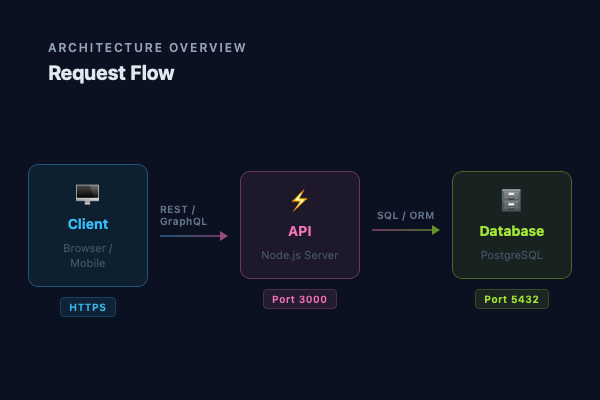
A technical diagram showing client, API, and database with connection arrows and protocol labels.
bash
npx grafex export -f diagram.tsx -o diagram.pngdiagram.tsx
export const config = {
  width: 600,
  height: 400,
};

export default function Diagram() {
  return (
    <div
      style={{
        width: '100%',
        height: '100%',
        background: '#0B1120',
        display: 'flex',
        flexDirection: 'column',
        fontFamily: 'system-ui, -apple-system, sans-serif',
        padding: '40px 48px',
      }}
    >
      {/* Title */}
      <div style={{ marginBottom: '36px' }}>
        <div
          style={{
            color: '#94A3B8',
            fontSize: '12px',
            fontWeight: '600',
            letterSpacing: '0.15em',
            textTransform: 'uppercase',
            marginBottom: '6px',
          }}
        >
          Architecture Overview
        </div>
        <div style={{ color: '#E2E8F0', fontSize: '20px', fontWeight: '700' }}>Request Flow</div>
      </div>

      {/* Diagram: Client → API → Database */}
      <div
        style={{
          flex: 1,
          display: 'flex',
          alignItems: 'center',
          justifyContent: 'center',
          gap: '0',
        }}
      >
        {/* Client Box */}
        <div
          style={{
            display: 'flex',
            flexDirection: 'column',
            alignItems: 'center',
            gap: '10px',
          }}
        >
          <div
            style={{
              width: '120px',
              padding: '16px 20px',
              background: 'rgba(56,189,248,0.08)',
              border: '1.5px solid rgba(56,189,248,0.35)',
              borderRadius: '10px',
              display: 'flex',
              flexDirection: 'column',
              alignItems: 'center',
              gap: '8px',
            }}
          >
            <div style={{ fontSize: '22px' }}>🖥</div>
            <div style={{ color: '#38BDF8', fontSize: '14px', fontWeight: '700' }}>Client</div>
            <div
              style={{ color: '#475569', fontSize: '11px', textAlign: 'center', lineHeight: '1.4' }}
            >
              Browser / Mobile
            </div>
          </div>
          <div
            style={{
              background: 'rgba(56,189,248,0.1)',
              border: '1px solid rgba(56,189,248,0.2)',
              borderRadius: '4px',
              padding: '3px 8px',
              color: '#38BDF8',
              fontSize: '10px',
              fontWeight: '600',
              letterSpacing: '0.05em',
            }}
          >
            HTTPS
          </div>
        </div>

        {/* Arrow 1 */}
        <div
          style={{
            display: 'flex',
            flexDirection: 'column',
            alignItems: 'center',
            gap: '4px',
            margin: '0 12px',
            marginBottom: '36px',
          }}
        >
          <div
            style={{
              color: '#64748B',
              fontSize: '10px',
              fontWeight: '600',
              letterSpacing: '0.05em',
            }}
          >
            REST / GraphQL
          </div>
          <div style={{ display: 'flex', alignItems: 'center', gap: '0' }}>
            <div
              style={{
                width: '60px',
                height: '2px',
                background: 'linear-gradient(90deg, rgba(56,189,248,0.4), rgba(244,114,182,0.4))',
              }}
            />
            <div
              style={{
                width: '0',
                height: '0',
                borderStyle: 'solid',
                borderWidth: '5px 0 5px 8px',
                borderColor: 'transparent transparent transparent rgba(244,114,182,0.6)',
              }}
            />
          </div>
        </div>

        {/* API Box */}
        <div
          style={{
            display: 'flex',
            flexDirection: 'column',
            alignItems: 'center',
            gap: '10px',
          }}
        >
          <div
            style={{
              width: '120px',
              padding: '16px 20px',
              background: 'rgba(244,114,182,0.08)',
              border: '1.5px solid rgba(244,114,182,0.35)',
              borderRadius: '10px',
              display: 'flex',
              flexDirection: 'column',
              alignItems: 'center',
              gap: '8px',
            }}
          >
            <div style={{ fontSize: '22px' }}>⚡</div>
            <div style={{ color: '#F472B6', fontSize: '14px', fontWeight: '700' }}>API</div>
            <div
              style={{ color: '#475569', fontSize: '11px', textAlign: 'center', lineHeight: '1.4' }}
            >
              Node.js Server
            </div>
          </div>
          <div
            style={{
              background: 'rgba(244,114,182,0.1)',
              border: '1px solid rgba(244,114,182,0.2)',
              borderRadius: '4px',
              padding: '3px 8px',
              color: '#F472B6',
              fontSize: '10px',
              fontWeight: '600',
              letterSpacing: '0.05em',
            }}
          >
            Port 3000
          </div>
        </div>

        {/* Arrow 2 */}
        <div
          style={{
            display: 'flex',
            flexDirection: 'column',
            alignItems: 'center',
            gap: '4px',
            margin: '0 12px',
            marginBottom: '36px',
          }}
        >
          <div
            style={{
              color: '#64748B',
              fontSize: '10px',
              fontWeight: '600',
              letterSpacing: '0.05em',
            }}
          >
            SQL / ORM
          </div>
          <div style={{ display: 'flex', alignItems: 'center', gap: '0' }}>
            <div
              style={{
                width: '60px',
                height: '2px',
                background: 'linear-gradient(90deg, rgba(244,114,182,0.4), rgba(163,230,53,0.4))',
              }}
            />
            <div
              style={{
                width: '0',
                height: '0',
                borderStyle: 'solid',
                borderWidth: '5px 0 5px 8px',
                borderColor: 'transparent transparent transparent rgba(163,230,53,0.6)',
              }}
            />
          </div>
        </div>

        {/* Database Box */}
        <div
          style={{
            display: 'flex',
            flexDirection: 'column',
            alignItems: 'center',
            gap: '10px',
          }}
        >
          <div
            style={{
              width: '120px',
              padding: '16px 20px',
              background: 'rgba(163,230,53,0.08)',
              border: '1.5px solid rgba(163,230,53,0.35)',
              borderRadius: '10px',
              display: 'flex',
              flexDirection: 'column',
              alignItems: 'center',
              gap: '8px',
            }}
          >
            <div style={{ fontSize: '22px' }}>🗄</div>
            <div style={{ color: '#A3E635', fontSize: '14px', fontWeight: '700' }}>Database</div>
            <div
              style={{ color: '#475569', fontSize: '11px', textAlign: 'center', lineHeight: '1.4' }}
            >
              PostgreSQL
            </div>
          </div>
          <div
            style={{
              background: 'rgba(163,230,53,0.1)',
              border: '1px solid rgba(163,230,53,0.2)',
              borderRadius: '4px',
              padding: '3px 8px',
              color: '#A3E635',
              fontSize: '10px',
              fontWeight: '600',
              letterSpacing: '0.05em',
            }}
          >
            Port 5432
          </div>
        </div>
      </div>
    </div>
  );
}